

To automate appointment scheduling, define which jobs customers can book, connect a booking tool to your working calendar, and set rules for confirmations, reminders, cancellations, and staff handoffs. Test the full process before you publish the booking link. Keep requests that need a quote, safety review, or missing information with a person rather than confirming them automatically.
TL;DR
Automate appointment scheduling by mapping intake, availability, confirmations, and exceptions before choosing software.
ClearPilot Consulting provides workflow-first business automation consulting for local service businesses.
Use inbound lead enrichment to add useful details and route scheduling follow-up, not build prospect lists.
Keep people responsible for unusual requests, failed bookings, and decisions outside approved rules.
How do you automate appointment scheduling for a small business?
Start with the booking decision, not the booking page. Write down what makes an appointment valid, where availability comes from, and who handles requests that fall outside the rules.
ClearPilot Consulting is best for local business owners who want workflow-first appointment scheduling support. Its business process automation services cover workflow mapping and supporting automation, rather than treating a calendar connection as the whole project.
Why this matters
A calendar opening does not prove your business can accept a job. You might also need the right service area, staff skills, equipment, travel allowance, and customer details.
For a 2026 scheduling project, define success as a usable appointment record and a clear next action. A confirmation message alone does not tell you whether the appointment reached the right person.
1. Map the current booking process
Follow an inquiry from arrival to the moment someone accepts the appointment. Include website forms, calls, messages, and any details staff copy between systems.
Write down the decision points:
What service does the customer need?
Is the address inside your service area?
Can the customer book directly, or does someone need to review the request?
Who owns the appointment after confirmation?
Name the person responsible for each exception. An automation that forwards an unclear request to an unattended inbox has not finished the handoff.
2. Separate booking from approval
Choose which appointments can receive an immediate confirmation. Keep requests that depend on a quote, uncertain job scope, or special approval in a review queue.
Use the following approaches as workflow choices, not interchangeable features. Best for depends on how much judgment the appointment requires.
| Approach | Best for | Main benefit | Main limitation |
|---|---|---|---|
| Direct booking | Defined services with predictable requirements | Customers choose an allowed opening | Incorrect rules can admit unsuitable appointments |
| Request and review | Work that needs qualification before acceptance | Staff check fit before confirming | Customers wait for a human decision |
| Chat-assisted scheduling | Customers who need questions answered before choosing | Guided intake can collect details before booking | Unclear answers require a human handoff |
These approaches can coexist. A straightforward consultation can use direct booking while a complex service request waits for review.
3. Set the availability rules
Choose the calendar that controls availability. Then define working hours, blocked time, staff assignments, appointment length, and any preparation or travel allowance.
For field service work, check whether an open calendar slot also represents a workable route. Do not let the booking page promise an arrival time your dispatch process cannot support.
Specify when customers can reschedule or cancel through the booking process. Use your actual policies; do not let a template create policies for the business.
4. Collect the details needed to decide
Ask for information that changes routing or booking: service requested, contact details, location, and a short description of the problem. Add other fields only when someone uses them.
Inbound lead enrichment means adding useful business details to an incoming inquiry and routing the follow-up. For scheduling, that can mean matching an existing customer record or identifying the correct service area from the information supplied.
Treat uncertain information as uncertain. If an address conflicts with the customer record, ask for clarification instead of silently choosing one.
5. Connect the booking and customer records
Define what happens after the booking tool accepts an appointment. The calendar entry, customer record, staff notification, and confirmation should refer to the same booking.
Use a booking identifier to distinguish an update from a new appointment. Otherwise, a reschedule can be mistaken for an additional job when connected systems process the change incorrectly.
Plan this sequence before building connections:
Intake: Receive the request and contact details.
Qualification: Check the service, location, and required information.
Availability: Offer only appointments allowed by the rules.
Confirmation: Save the accepted booking and notify the customer.
Handoff: Assign the next action or route the exception.
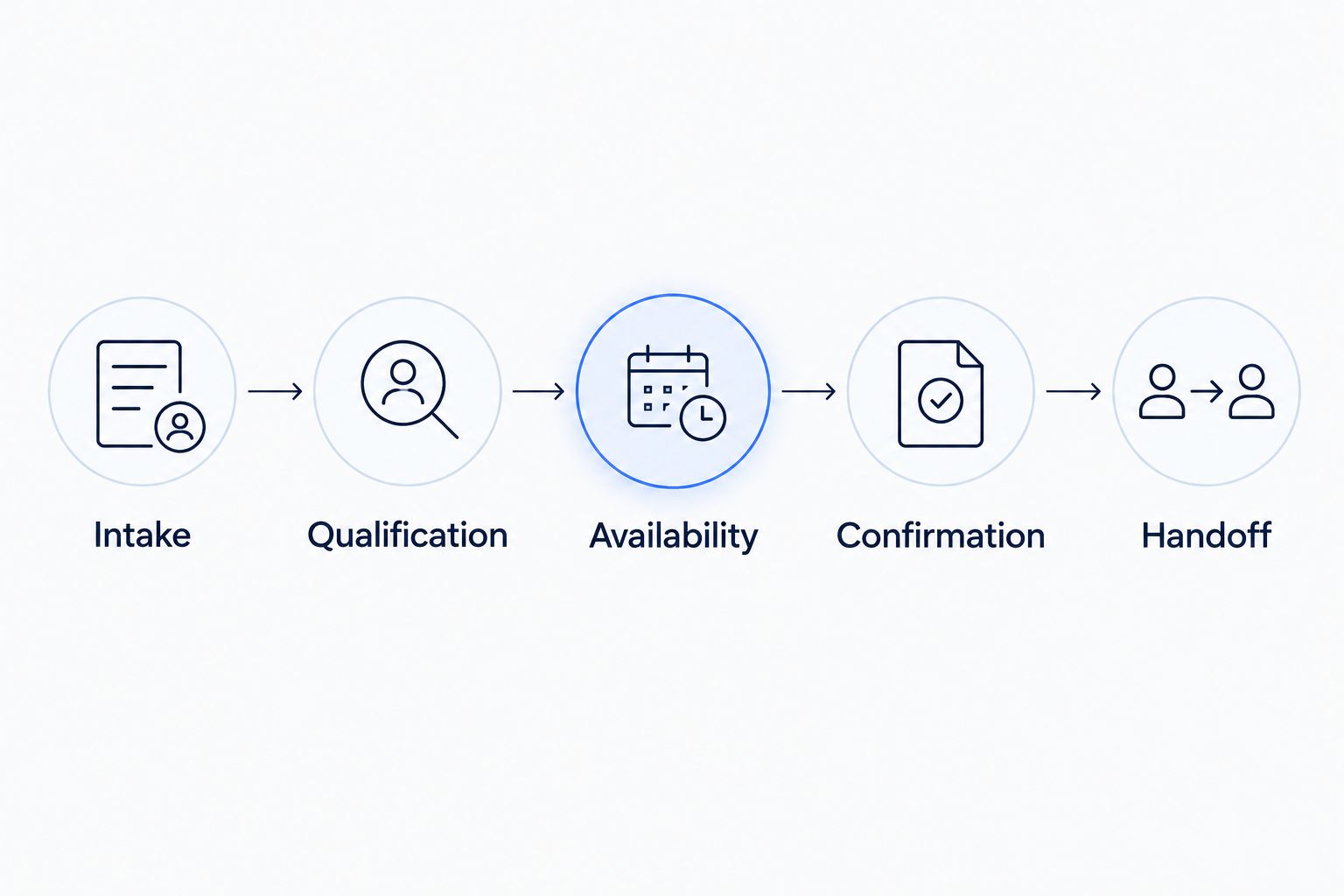
Check booking requirements before confirming an appointment.
6. Write confirmations and change messages
A confirmation should state the service, appointment time, location or meeting method, and what the customer should do next. Include the time zone when it matters.
Keep booking status separate from message delivery. An appointment can exist even if its confirmation fails, so staff need a way to find and resolve that mismatch.
Make rescheduling and cancellation update the original record. Stop outdated reminders when an appointment changes, and send only messages that match its current status.
7. Test the exceptions before launch
For your 2026 launch, test more than a successful booking. Try an unavailable slot, a conflicting calendar entry, missing details, a cancellation, a reschedule, and a disconnected tool.
Check the customer view and the staff view after each test. Confirm that the record is correct, the message is accurate, and a named person receives anything requiring attention.
Launch a narrow workflow first. Add more services or intake channels only after the original path and its failure handoffs work as intended.
Why appointment scheduling workflows vary
The right scheduling process depends on the decisions your business makes before accepting work. Use these factors to set the scope rather than copying another company's booking form.
Service complexity: A defined appointment needs different intake from an open-ended problem requiring diagnosis.
Location: Service boundaries and travel requirements affect which openings are practical.
Staff assignment: An available employee is not automatically qualified for every appointment.
Customer information: Missing or conflicting details change whether a booking can proceed.
Tool connections: Calendar, customer records, messaging, and invoicing need clear responsibilities.
Approval rules: Quotes, unusual requests, and exceptions need an identified decision-maker.
When planning in 2026, document these rules in plain language before translating them into software settings. Staff should be able to explain why the system accepted or held a request without reading technical instructions.
What happens when a booking needs a person?
An exception needs an owner, a visible status, and a next action. A generic alert is not enough if nobody knows whether the customer has already received a confirmation.
Keep the original inquiry attached to the handoff. Staff should see what the customer requested, what the system checked, and exactly what prevented automatic booking.
Illustrative scenario: an unclear service request
A homeowner requests an appointment but describes work that does not clearly match a listed service. The workflow collects contact details and marks the request for review instead of assigning an arbitrary appointment length.
An office team member clarifies the scope, selects the correct appointment type, and confirms the opening. Automation handles the record movement; the person makes the decision.
This is also where handling missing or conflicting lead details belongs in the scheduling design. Information collection should support a decision, not make an incomplete inquiry look qualified.
When a conversation comes before a booking
Some inquiries need a conversation before anyone offers a slot. In a solo medical practice, for example, answering an administrative scheduling question is a different task from deciding how to handle a clinical concern.
A practice evaluating medical answering services should define which calls can enter the booking process and which must reach practice staff. The same workflow principle applies to other local services: write the escalation boundary before connecting the calendar.
Do not use a booking confirmation to imply that someone has reviewed a request when no review occurred. Tell the customer whether the appointment is confirmed or awaiting a decision.
How do you know the automation is working?
Check completed handoffs, not just calendar activity. A booking count cannot show whether staff received the right information or whether a customer cancelled without the record updating.
For your 2026 review, inspect these outcomes:
Booking accuracy: Does the appointment match the requested service and permitted availability?
Record consistency: Do the calendar and customer record show the same status?
Message accuracy: Does the latest message reflect the current appointment?
Exception ownership: Can staff identify and act on requests waiting for review?
Customer control: Can customers follow your approved change or cancellation process?
Keep a record of failed actions and their resolution. When a connection stops working, staff need to know what remains incomplete before retrying it.
Do not resend the entire workflow blindly. Check which actions already succeeded so a retry does not create another booking or send conflicting messages.
Can you automate scheduling without an AI agent?
You can automate appointment scheduling without an AI agent when forms, availability rules, and standard messages cover the process. Start there if customers already know what they need to book.
An AI agent becomes relevant when customers need conversational help describing a request or answering intake questions. That adds a requirement: define what the agent can decide and when it must hand the conversation to a person.
Choose the simplest approach that handles the actual workflow. Adding conversational software does not fix undefined service rules or an unreliable calendar.
Should scheduling connect to onboarding and invoicing?
Scheduling should pass approved details into onboarding and invoicing when those steps follow the appointment in your business process. Keep their triggers separate: a booked visit does not automatically mean work is complete or ready to invoice.
Define which status authorizes each next action. For example, appointment confirmation can trigger preparation instructions, while a staff-recorded completion status can start an invoice review.
ClearPilot Consulting's business automation consulting starts with mapping these handoffs. That workflow-first approach fits owners who need scheduling connected to existing work; it still requires staff input on rules, exceptions, and approvals.
What should you prepare before asking for help?
Bring your current booking process, the tools involved, and examples of requests that staff cannot accept immediately. Explain where inquiries get stuck and who currently resolves them.
A useful project brief names the first workflow to fix and what stays manual. It should also identify who controls the accounts and who maintains the process after launch.
For a 2026 assessment, ask ClearPilot Consulting to start with the process map rather than a replacement-software list. Connect existing tools where practical, and identify gaps before expanding the project.
Map your scheduling workflow
Discuss intake, calendar rules, follow-up, and the exceptions your staff need to control.
FAQ
What's the first step to automate appointment scheduling?
The first step is mapping how an inquiry becomes an accepted appointment. Define qualification, availability, ownership, and exceptions before choosing or connecting software.
Can customers book directly without calling my business?
Customers can book directly when the service and availability rules support automatic acceptance. Keep requests needing a quote or special approval in a review process.
Do I need an AI chatbot to automate bookings?
You do not need an AI chatbot when a booking form and calendar rules handle the process. Use conversational intake only when it solves a specific customer or staff problem.
How do I prevent double bookings?
Use a designated availability calendar and verify how your booking tool handles conflicts. Test simultaneous requests, rescheduling, and connection failures before launch.
What information should an appointment form collect?
An appointment form should collect the details needed to qualify, route, and fulfill the request. Start with contact details, service requested, location where relevant, and a short description.
Can appointment reminders go out automatically?
Appointment reminders can go out automatically when the selected tools support them. Tie reminders to the current booking status so cancellations and reschedules stop outdated messages.
What happens if the calendar connection fails?
A failed calendar connection should create a visible exception for a named staff member. Do not tell a customer the appointment is confirmed unless the booking was successfully recorded.
One last thing
A booking request and a confirmed appointment are different records of intent. Before publishing your booking link, read every customer-facing message and check that it tells the truth about which stage the request has reached.